Detailed guide

Estimate Workflow

The estimate operating workflow for turning project scope into a defendable chargeout, cost, and margin model before quote publication.

Estimate Workflow is the commercial planning control point inside a project. It should explain exactly why a project is priced as it is, what cost assumptions were used, and whether expected margin is still acceptable before any client-facing quote or billable record is touched.

Quick summary

  • Open the current estimate and validate status, margin target, and lock state before editing line structure.
  • Compare projected margin versus target after each significant quantity, rate, or resource-split change.
  • Review line-level cost and remaining hours to detect unrealistic effort assumptions before quote publication.
  • Expand history before approval so downstream commercial reviewers can trace major estimate edits.
  • Use quick-add actions sparingly and only when catalog maintenance ownership agrees a new reusable input is needed.

Put it into practice

  1. Start from project context and confirm you are editing the intended estimate record. Validate estimate number, quote state, and project name before changing any pricing input.

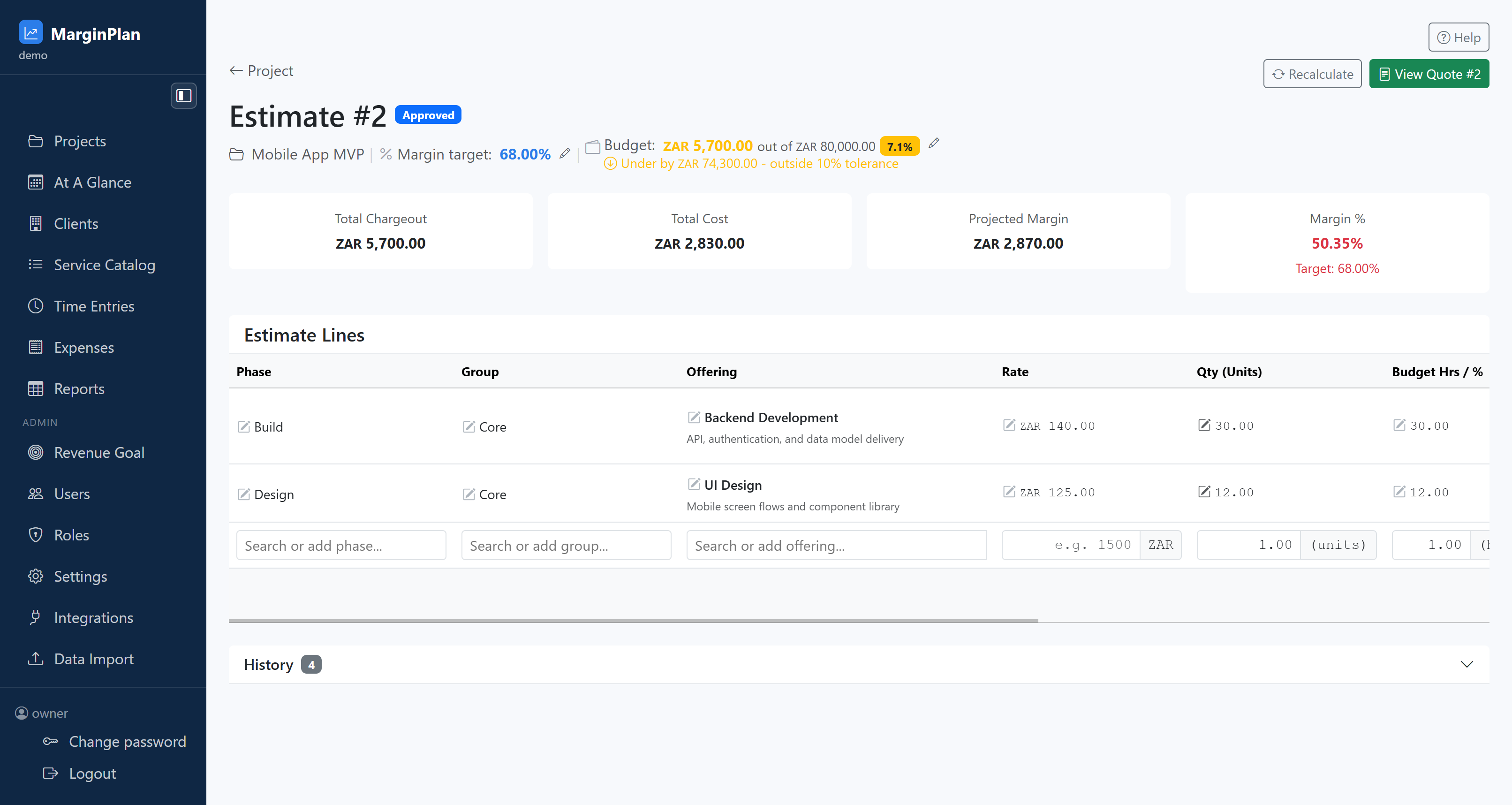
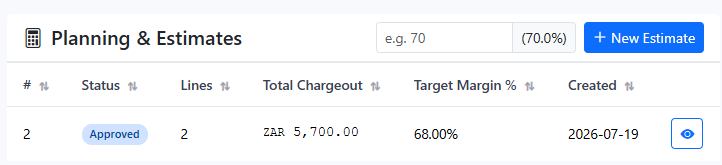
    InteractionsProject Detail: open Planning & Estimates, then open the target estimate row to reach Estimate Workflow.
    Start from project context and confirm you are editing the intended estimate record. Validate estimate number, quote state, and project name before changing any pricing input.
    Open workflow: Project Detail
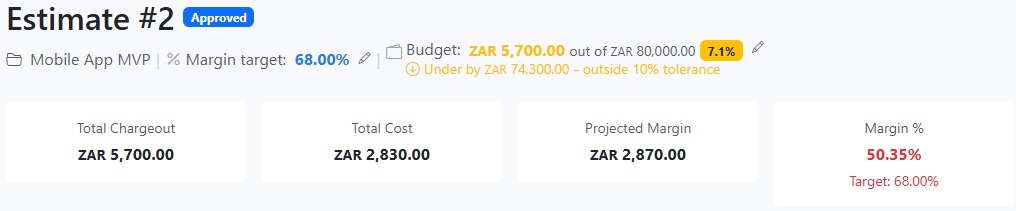
  2. Read margin target and budget utilization first. This tells you whether the model is currently underpriced, over budget, or already outside tolerance before you touch line items.

    InteractionsEstimate header: review Margin target, Budget used, and tolerance warning strip near the top of the page.
    Read margin target and budget utilization first. This tells you whether the model is currently underpriced, over budget, or already outside tolerance before you touch line items.
  3. Check the lock-state banner before assuming estimate edits are available. If the estimate is locked because a quote was accepted, use the quote flow for controlled downstream changes.

    InteractionsEstimate page: review the blue lock notice under the header and follow its instruction path when locked.
    Check the lock-state banner before assuming estimate edits are available. If the estimate is locked because a quote was accepted, use the quote flow for controlled downstream changes.
    Open workflow: Quote Workflow
  4. Use the summary cards as a baseline quality gate. Record the current Total Chargeout, Total Cost, Projected Margin, and Margin % before making any structural edits.

    InteractionsEstimate page: read the four summary cards directly above the Estimate Lines section.
    Use the summary cards as a baseline quality gate. Record the current Total Chargeout, Total Cost, Projected Margin, and Margin % before making any structural edits.
  5. Audit each estimate line for scope integrity: phase, offering, rate, quantity, budget hours, and resource allocation must all reflect how delivery will actually execute.

    InteractionsEstimate Lines table: scan rows left to right and inspect resource chips plus remaining hours for each offering line.
    Audit each estimate line for scope integrity: phase, offering, rate, quantity, budget hours, and resource allocation must all reflect how delivery will actually execute.
  6. Add a new estimate line from the inline Add row. Select or type a Phase and Group, choose the Offering, then confirm rate, units, and budget-hours inputs before saving.

    InteractionsEstimate Lines table footer: use the row with Search or add phase/group/offering fields, then click Add on the far right.
    Add a new estimate line from the inline Add row. Select or type a Phase and Group, choose the Offering, then confirm rate, units, and budget-hours inputs before saving.
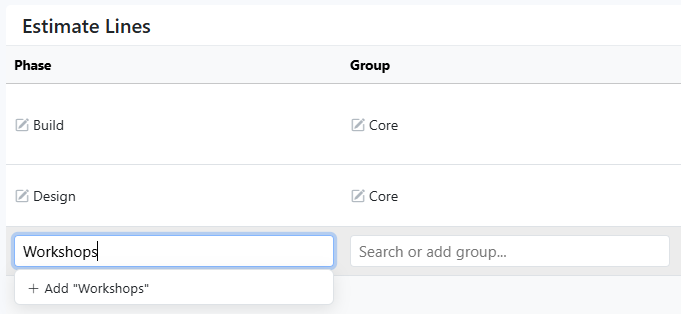
  7. Create new Phase or Group labels directly in the inline selectors when the exact delivery bucket does not exist. Enter the new value in the search box, select the create option, and confirm it appears on the line before saving.

    InteractionsInline Add row: Phase and Group search fields in the first two columns. After typing the word e.g. "Workshops", if the search box doesn't have an existing phase or group that matches, you can click the '+ Add "Workshops"'
    Create new Phase or Group labels directly in the inline selectors when the exact delivery bucket does not exist. Enter the new value in the search box, select the create option, and confirm it appears on the line before saving.
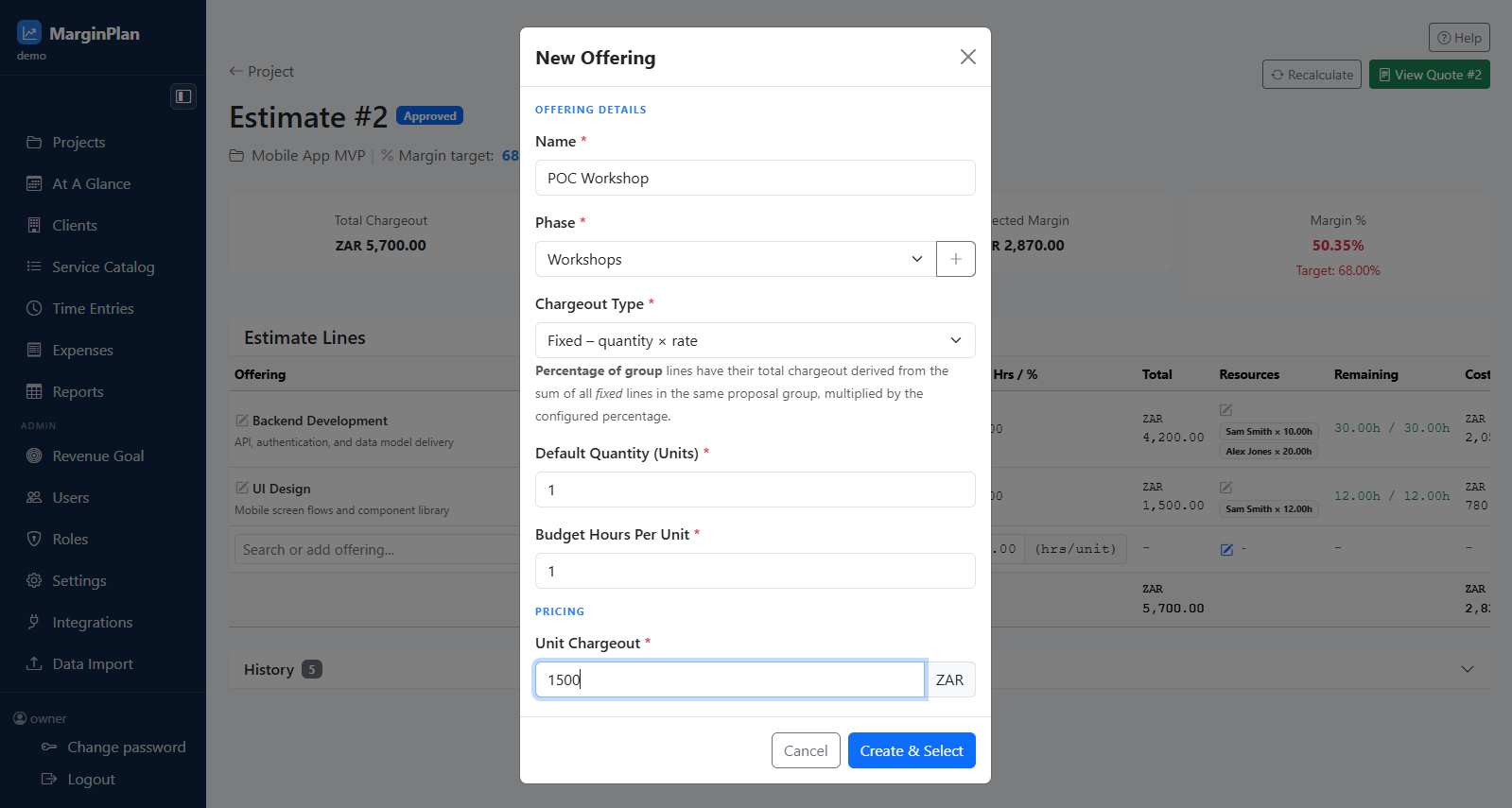
  8. If the required Offering does not exist, use the quick add flow to create it, then return to the same Add row and select it before saving the line.

    InteractionsInline Add row: Offering search field and quick-add option in the selector.
    If the required Offering does not exist, use the quick add flow to create it, then return to the same Add row and select it before saving the line.
    Open workflow: Catalog Offering Form
  9. After the line is added, open the Resources editor from that same line so resource allocation can be completed immediately.

    InteractionsEstimate Lines table: click the Add resources pencil action in the Resources column for the new line.
    After the line is added, open the Resources editor from that same line so resource allocation can be completed immediately.
  10. Assign one or more people with hours in the Resources editor, save, and verify Remaining turns green with allocated hours matching budget hours.

    InteractionsResources editor modal: add resources, enter hours, click Save, then confirm the line-level Remaining indicator in the table.
    Assign one or more people with hours in the Resources editor, save, and verify Remaining turns green with allocated hours matching budget hours.
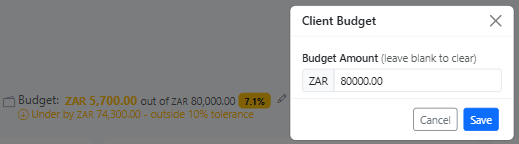
  11. When assumptions changed, update budget context with the budget edit action before final margin judgement so percentage and tolerance checks are interpreted correctly.

    InteractionsEstimate header: click the small budget edit icon beside budget utilization and confirm the new budget value.
    When assumptions changed, update budget context with the budget edit action before final margin judgement so percentage and tolerance checks are interpreted correctly.
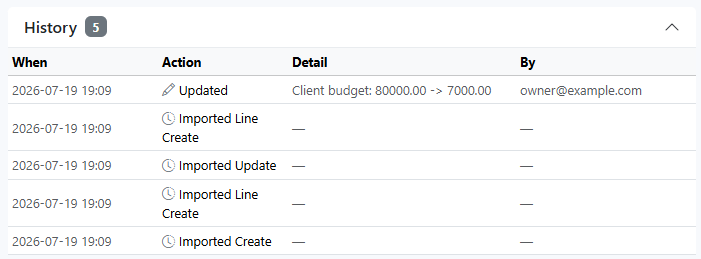
  12. Expand History and verify key edits are traceable. This is the audit checkpoint before quote handoff, especially when rates, quantities, or structure changed recently.

    InteractionsBottom of Estimate Lines: open the History accordion and review timestamped action rows.
    Expand History and verify key edits are traceable. This is the audit checkpoint before quote handoff, especially when rates, quantities, or structure changed recently.
  13. Once estimate quality is acceptable, move to quote review through the quote handoff action and confirm downstream records still match approved estimate assumptions.

    InteractionsEstimate header area: use View Quote and continue review in the quote workflow.
    Once estimate quality is acceptable, move to quote review through the quote handoff action and confirm downstream records still match approved estimate assumptions.
    Open workflow: Quote Workflow

What to review

Estimate header and status

Confirms estimate number, workflow status, and project context before changes are made. Always verify this first so you do not update the wrong estimate.

Project context strip

Shows project name, margin target, and current budget utilization so every line-level edit is anchored to the wider project commercial boundary.

Locked-state banner

When a quote has already been accepted, this banner explains that structural editing is restricted and points users to the accepted quote flow for controlled resource reassignment.

See guide: Quote Workflow

Totals and margin summary cards

Use Total Chargeout, Total Cost, Projected Margin, and Margin % as the immediate quality gate before and after each estimate change.

Estimate line items

Each row should represent real delivery scope with explicit phase, offering, quantity, effort, resource split, cost, and margin contribution.

Resource allocation chips

The resource chips on each line show effort distribution. Use them to confirm workload and cost assumptions align with expected team delivery.

History panel

Tracks estimate change events over time. Expand this before approval to confirm major edits are traceable and explainable.

Budget editor action

The inline budget editor updates estimate context when project budget assumptions changed and must be reflected in planning quality checks.

Quote handoff action

The quote handoff link confirms the downstream commercial record that this estimate is feeding and is the next review checkpoint once estimate quality is acceptable.

See guide: Quote Workflow

Quick Add Offering modal

Use only when a reusable catalog offering does not exist yet and the pricing owner has confirmed a new offering is required.

See guide: Catalog Offering Form

Quick Add Resource and Rate modals

Create missing resources and rate cards in flow when justified, then immediately verify no duplicate catalog records were introduced.

See guide: Catalog Resource Form
Guardrails

  • Line items, rates, quantities, and resource effort splits must be internally consistent before totals are considered valid for decision-making.
  • Margin target variance should trigger estimate review before quote send, not after client acceptance.
  • Budget tolerance warnings should be treated as planning defects to resolve, not as cosmetic alerts to ignore.
  • History entries should reflect the key structural edits made during the cycle so commercial approval can be audited later.
  • Quick-add modal saves should only be accepted once duplicate-risk has been checked against existing catalog entries.
  • Estimate editing should remain restricted to roles accountable for delivery planning quality and commercial margin control.
  • Quote and invoice workflows may be visible while estimate structure remains locked depending on approval state and role rights.
  • Catalog create/edit rights should stay with designated owners to avoid inconsistent rate and offering standards.

If it starts drifting

  • If totals look wrong, isolate the most recently edited line and validate its quantity, rate, and resource-hours split before broader debugging.
  • If margin suddenly collapses, check for silent rate fallback, accidental quantity inflation, or resource mix drift toward higher-cost contributors.
  • If estimate edits are unavailable, verify whether the estimate is intentionally locked by accepted quote state before escalating as a bug.
  • If a needed resource or rate is missing, confirm catalog scope first; create new records only after checking for near-duplicate entries.
  • If quote values do not match estimate expectations, verify the quote was generated from the current estimate revision and not a stale prior state.